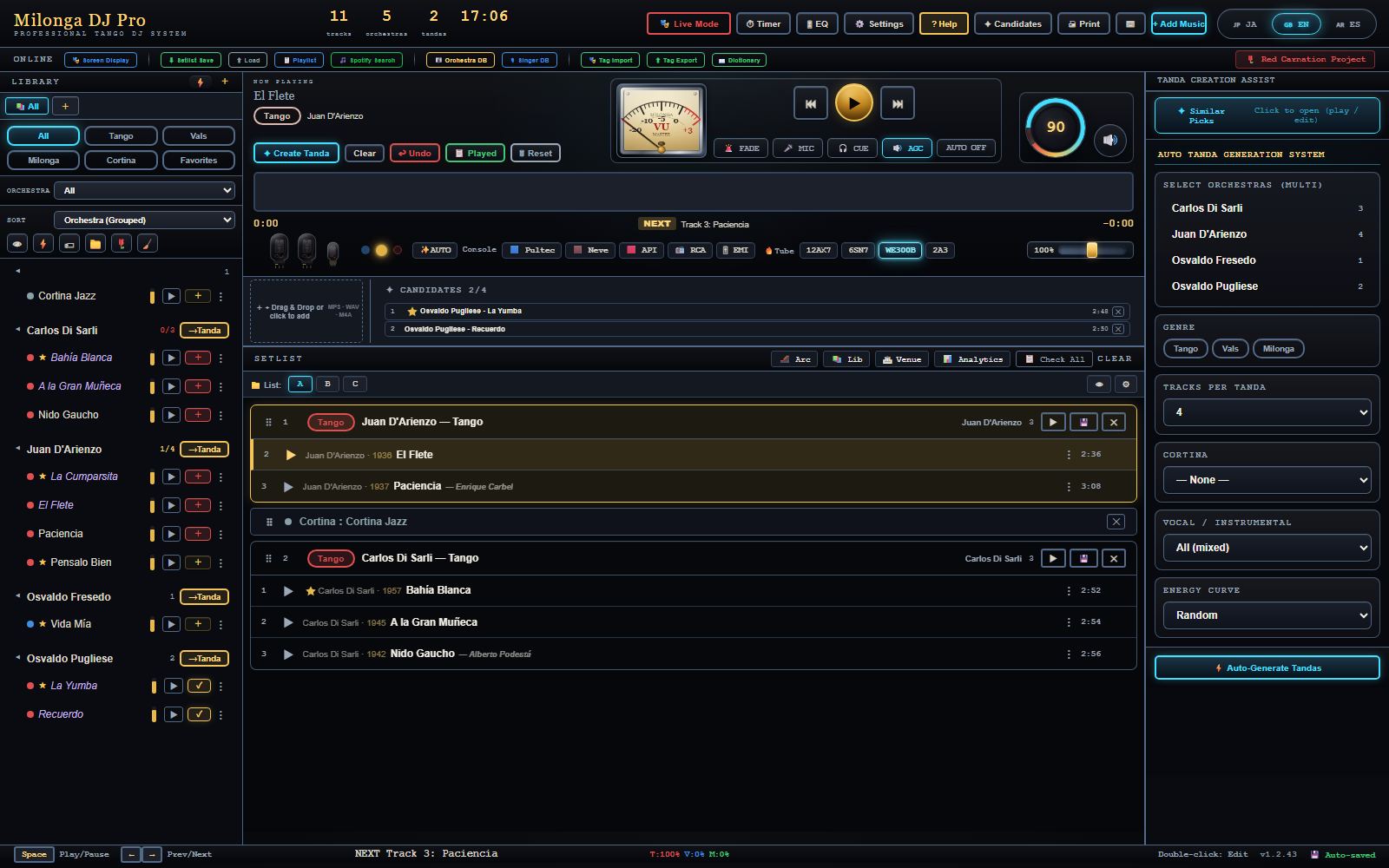
Actual Milonga DJ Pro app screen (July 2026)
October 2026 Update (v1.2.62)
Milonga DJ craft, built right in. Auto-generation and the last-tanda planner make shaping a whole night much easier.
🎼 Auto-tandas that follow traditionNEW
"⚡ Auto-generate tandas" now follows the T T V T T M rotation, never repeats an orchestra back to back, and alternates rhythmic and lyrical orchestras. Each tanda is grouped by the same singer and recording era; vals and milonga tandas default to 3 tracks.
🔢 Choose how many tandasNEW
Pick 1–20 tandas (or All). The estimated running time (including cortinas) is shown, and generating again continues the rotation from where you left off.
🌹 Last tanda + La CumparsitaNEW
Set an end time in the Timer to see the time left at all times. You get a reminder 20 minutes before the end, and one press of "🌹 Last" sets the final tanda followed by La Cumparsita. Press it again to undo.
📚 Tango DB: 151 titlesNEW
The bundled DB now covers 151 titles. Valses like "Corazón de oro" are detected even without "vals" in the filename, and tangos like "Milonguero viejo" are no longer mistaken for milongas.
⚡ Smooth with large librariesNEW
Much lower memory use, so importing hundreds of tracks at once no longer exhausts memory.
🛡 Even safer on the nightNEW
The tanda that is playing can no longer be undone by mistake, and the bundled DB now loads correctly in the Windows app.
Summer 2026 Major Update
The v1.2.x series doubles down on two promises: playback that never stops mid-milonga, and set-building that's genuinely fun.
🎭 Smarter Recommendations
"Suggest next" and "Similar songs" rank by mood × intensity × BPM and now prefer the same singer — matching the tradition of building vocal tandas around one voice. Your mood dictionary survives restarts, too.
🛡 Playback That Never Stalls
If a track's audio goes missing, playback skips it automatically and moves on. Missing tracks show a 🔇 mark in the library and are excluded from tanda building — no more silent dead air.
🔗 Tanda Relinking
Reorganized your music folder? Saved tandas show a ⚠ badge you can click to reattach tracks, with automatic suggestions from recorded track names.
🧳 Stronger Backups
The full backup now includes your mood dictionary and custom DB. A 30-day reminder and persistent-storage protection keep your library doubly safe.
🖥 Live Mode Evolved
A next-tanda preview (orchestra, tracks, total time) is always visible. Bigger buttons and red 6-second warnings — built for dark venues.
✨ Refreshed Feel
Every button glows on hover, and the console-EQ / tube selectors light up blue like LEDs when active. The toolbar is grouped for quick scanning.
Main Features
Tango Quiz Companion NEW / FREE
Turn Milonga DJ Pro into a tool that trains DJs. Your library becomes your ear-training set.
Just load the ExcelDB you export from Milonga DJ Pro, and quiz yourself on the orchestra, singer, era, and mood of each track as it plays. It builds the most fundamental skill a DJ needs — recognizing a recording at first listen — using your own music, at your own pace. No installation, runs in the browser, everything stays on your device.
🎧 Quiz on your own music
Loads the ExcelDB (.xlsx / .csv) from Milonga DJ Pro directly. Your library becomes the question set.
🧠 Train your ear
A quiz on hearing the orchestra, singer, era and mood. Builds the “recognize it at first listen” ear a DJ needs.
📝 Try it without audio
A bundled sample lets you try the text quiz right away, then switch to your own music.
🔒 Stays on your device
Your ExcelDB and audio are processed locally. The optional AI summary only sends data when you use your own API key.
Download & Install
1. Download the ZIP
Use "Free Download" above to save MilongaDJPro_Windows_v1.0.0.zip, then choose "Extract All". The ZIP name stays the same for link stability, but the MSIX inside is the latest (v1.2.62).
Chrome may flag the download as "suspicious" because the package is self-signed. Choose "Keep" from the download list.
If Windows shows "Windows protected your PC" when you run it, click "More info" → "Run anyway".
2. Easy update
After extraction, double-click 0_最初に実行_証明書登録とアップデート.cmd and approve the administrator prompt. It verifies the signature, registers the public certificate, and updates the app.
3. Manual method
Install MilongaDJPro.cer to "Local Machine" → "Trusted People", then open MilongaDJPro_1.2.62.0_x64.msix.
4. Launch
Start "Milonga DJ Pro" from the Start menu. The bundled .cmd can create a desktop shortcut.